
Set plans, free trials, and endpoint access
Combine base charges, usage prices, allowances, and endpoint access into clear plans. Add approval or private invitations when needed.
On this page
Choose base and usage charges
Open Pricing in the product editor and expand a plan. These examples show how the settings work; set actual prices according to your API costs and offer.
Public plan codes are BASIC, PRO, ULTRA, and MEGA, with at most four public plans and one recommended plan. A nonzero monthly base must be at least USD 1.
A plan with a monthly base can also charge Soft overage. The base is not a spending cap: meter overage, bandwidth, and taxes may also apply.
| Offer | Example settings | Buyer pays |
|---|---|---|
| Free | BASIC, USD 0 base; 10 Requests per month, Hard, zero overage price | No card required; calls stop when the allowance is exhausted |
| Monthly | PRO, USD 10 base; 1,000 Requests per month, Hard | USD 10 per month; calls stop at the allowance |
| Metered | USD 0 base; 0 included Requests per month, Soft, USD 0.01 flat overage | USD 0.01 per confirmed request; a payment method is required |
Grant access and enable the free trial
- Select Plan endpoint access to grant endpoints. Features only describe the plan to buyers and do not grant endpoints.
- For a free trial, keep a plan (usually BASIC) public and enabled with a zero monthly base, every meter free (Count only or Hard cap), and at least one granted endpoint.
- Save, test, and publish. Check that the plan shows “Activate for free” on the public page. Buyers test and call it from the buyer workspace after activating; the product page has no console. Disabling the plan, making it private, or making it chargeable stops public free activation.
Distinguish allowances, rate limits, and bandwidth
Daily allowances reset every 24 hours from the subscription time. Monthly allowances reset with the subscription cycle.
A free plan without a payment method blocks subsequent requests after exceeding bandwidth. The buyer can choose to enable paid excess bandwidth.
| Setting | What it controls | Where to configure it |
|---|---|---|
| Meter strategy and allowance | Units of each meter per period; Hard cap blocks after exhaustion, Allowance + overage keeps charging | Meter allowances and pricing in the plan card |
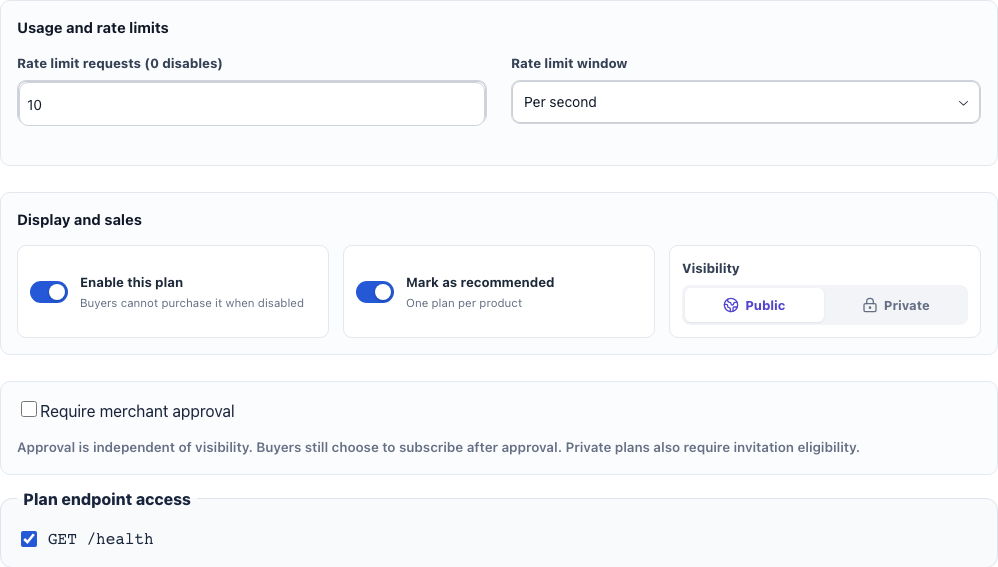
| Request limit and time window | How often each buyer can call; 0 disables the rate limit | Usage and rate limits within the plan |
| Bandwidth | 10 GB of combined requests and responses per cycle, then USD 1/GB | Platform terms shown to buyers |
Define meters and charge for processed units or tiers
More settings
- Under Meters at the top of Pricing, select Add meter to add one such as Images. An API has one to five meters; the default Requests meter can be renamed or deleted too. A meter’s name, metering method, description, and counted endpoints are shared by every plan, so you change them once, here. The name starts with a letter and uses only letters, digits, and hyphens; buyers see it in usage and billing, and the origin reports usage under it.
- Choose one unit per qualifying response or the actual value from the origin’s X-Invokora-Billing header, written as name=quantity, such as Images=3. Verify dynamic units against a real response. Counted endpoints default to All endpoints, including endpoints imported later; when only operations such as image generation should consume it, choose Selected endpoints and uncheck the rest, keeping at least one. After you re-import an OpenAPI document, endpoints it no longer declares leave the selection when you save.
- A new meter joins every plan as Count only, so existing plans do not change. In each plan card, under Meter allowances and pricing, choose its strategy for that plan: Count only (unlimited, no block, no charge), Hard cap (a period and a limit), Allowance + overage (an allowance of 0 is pure pay-as-you-go), or Tiered pricing (Graduated or Volume). When a plan grants none of the endpoints a meter counts, its row shows Not applicable with nothing to set; grant a related endpoint to configure it. With several plans, Plan comparison above lines them up; select a cell to jump to that plan.
- After publication a meter’s name and metering method are locked, because existing subscribers are metered under them; create a new meter for a different name or method. Description and counted endpoints stay editable, and changing counted endpoints requires testing the affected endpoints again. You can still add or delete meters; buyers on older revisions keep their purchased terms.
- Check zero usage, allowance boundaries, and tier boundaries in Representative charge preview. Add the base, other meters, and bandwidth when reviewing the overall offer.
Approve applicants or invite specific buyers
- To review intended use, enable Require merchant approval and write a question for applicants, then save and publish.
- New applications show a pending count on Customers in the sidebar and send a notification. Under Plan applications on the Customers page, review each answer and choose Approve or Decline; Review next to the plan on the Pricing tab opens that product’s applications. Approved buyers must still choose to subscribe.
- For selected customers, create a private CUSTOM plan. After saving, use Private plan invitations on the Endpoint tab: enter a verified buyer email, select Create invitation link, and copy the link shown in this session for that buyer.