
Check API usage, invoices, and renewals
Understand request allowances, metering objects, and bandwidth charges, manage payment methods, and cancel a subscription.
On this page
Check current usage in the API detail
- Open the API in “Purchased products”. Under “Plan and usage”, check the current plan, each metering object, bandwidth, and reset times.
- Review included units, billable units, and projected charges for each object separately. One HTTP request may consume several objects, so request count alone does not determine the bill.
- Under “Current-period billing (excl. tax)”, compare accrued, invoiced, and unbilled amounts. Use the invoice for final tax and paid totals.
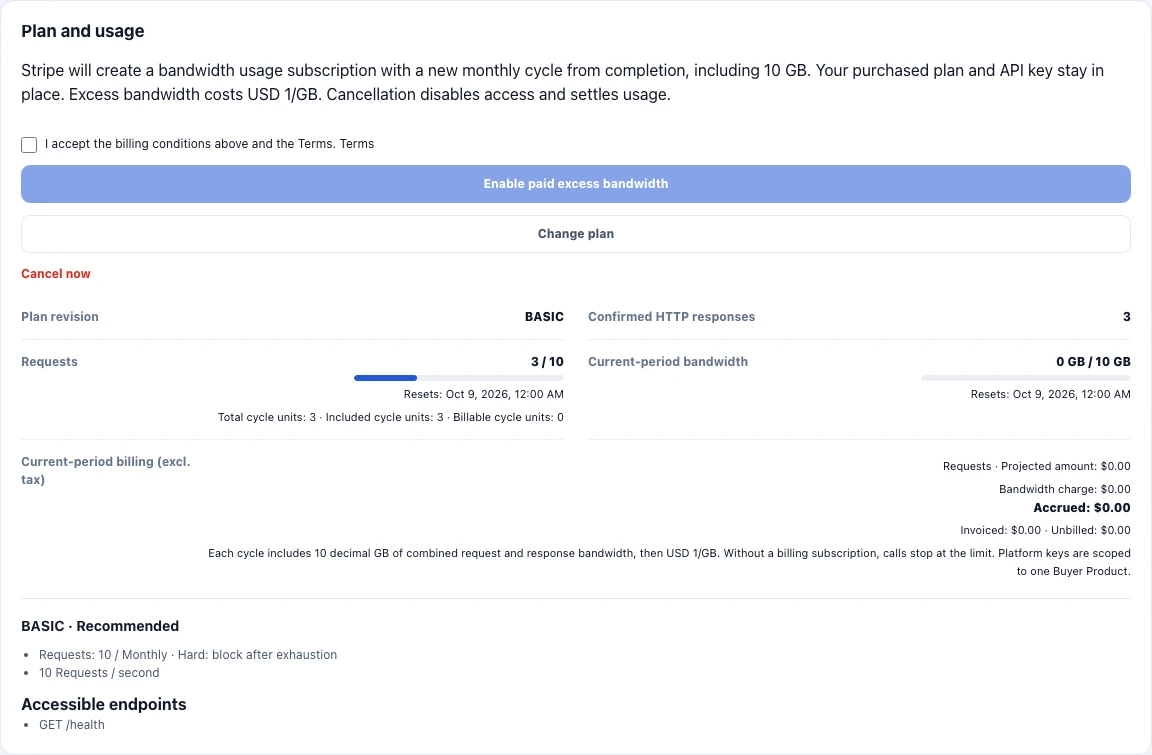
Check bandwidth and excess charges
Each billing cycle includes 10 decimal GB of combined request and response bandwidth, then USD 1/GB. A free plan without a billing subscription stops calls at the bandwidth limit.
If your free plan needs more bandwidth, read the “Enable paid excess bandwidth” conditions in the API detail, accept them, and choose “Enable paid excess bandwidth”. Completion starts a new monthly cycle, keeps your existing plan and key, and enables excess bandwidth charges.
Usage warnings and early invoice thresholds are not spending caps. Subscriptions containing Volume pricing settle at cycle end or cancellation. Other billing subscriptions attempt early collection at the applicable thresholds. The pricing information shows the current collection schedule.
View invoices and resolve a failed payment
- Choose “Billing” in the sidebar and find “API usage invoices”. Check merchant charges, bandwidth, tax, total, and status.
- Choose “View Stripe invoice” when a link is available. “Below-minimum carry” means the amount is below the minimum collectible charge and will accumulate in later settlements for the same product.
- If payment fails, choose “Manage payment methods” to check your payment details in Stripe and resolve unpaid invoices. Return to the product detail to confirm access has recovered.
Manage renewal, change plan, or cancel
Monthly API plans renew automatically on their agreed schedule; usage plans settle under their applicable usage rules. To change plans, use “Change plan” in the product detail or subscription entry in “Billing”, and review the target plan and confirmation page.
When you no longer need access, choose “Cancel renewal” on the subscription in “Billing” and confirm. You can keep calling the API until the current period ends; access then stops, and usage beyond the plan allowance, plus bandwidth, is settled. Unused days are not automatically refunded. Before the end you can choose “Resume renewal” at any time.
After the period ends, choose “Resubscribe” and complete the required steps. Canceling an API renewal and service maintenance’s “Cancel maintenance at period end” both take effect when the current period ends.
Ask about an API charge
Collect your account email, product name, invoice ID, amount, and reason, then contact support@invokora.com. API refund requests are reviewed case by case. A refund does not change the subscription or API access; cancel the renewal separately if you want to stop future renewals.
Contact billing support