
Try, subscribe to, and make your first API call
Start with the merchant’s product link, choose a plan, complete approval or payment, and send a real request.
On this page
Before you start
- The merchant’s API product link and a buyer account with a verified email.
Open the product and check endpoints and plans
- Open the merchant’s product link and read the endpoint documentation, parameters, and authentication requirements. “All API endpoints” lists the plans that include each endpoint.
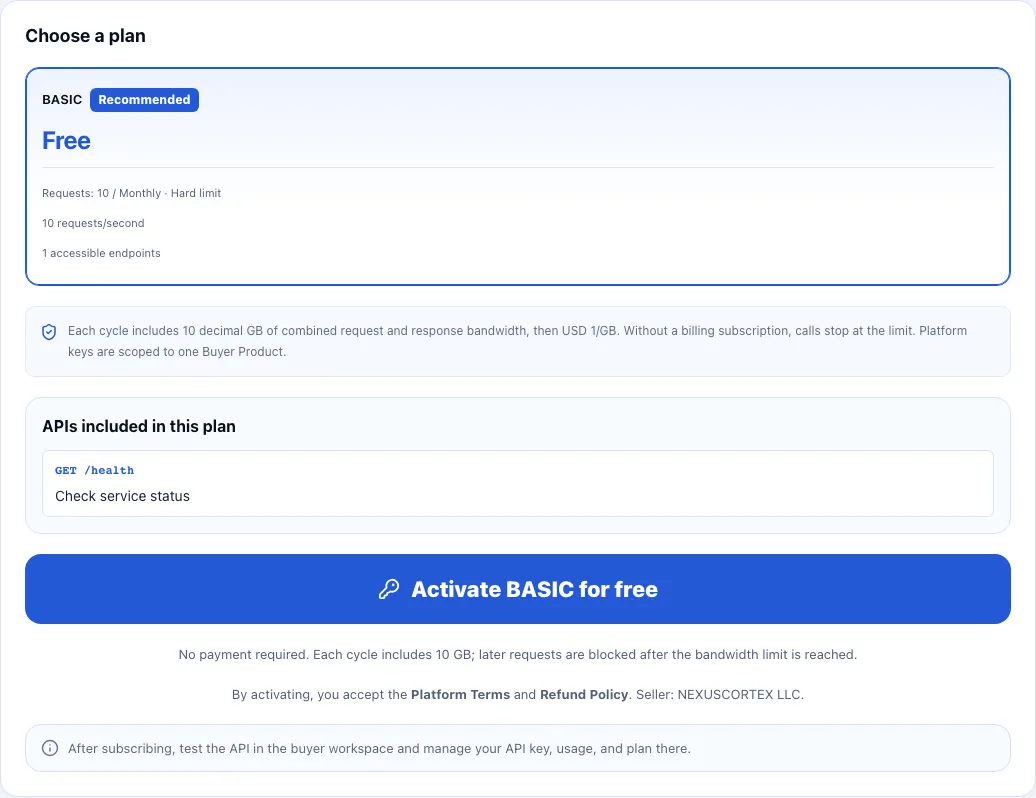
- To try it for free, choose the free plan (usually BASIC) under “Choose a plan” and check that it includes the endpoint you need. If the merchant offers no public free plan, only paid plans are shown.
- Sign in to your buyer account and verify your email. Visitors can read documentation and plans, but must sign in to activate one.
Apply first if the plan requires approval
- Under “Require merchant approval”, fill in “Your answer” and choose “Submit application”.
- Wait for the merchant, then return to the product and choose “Refresh status”. Once approved, continue activating or subscribing to the plan.
- Private plans also require a valid invitation. Approval does not replace invitation eligibility.
Activate for free, then send your first request in the buyer workspace
- On the product page, choose “Activate BASIC for free”. Plans requiring approval must be approved first. If you already subscribe to this API, the plans area shows your current plan and the plans you can change to.
- Immediately copy and save the API key displayed after activation; it is shown only once. Then choose “Open buyer workspace”.
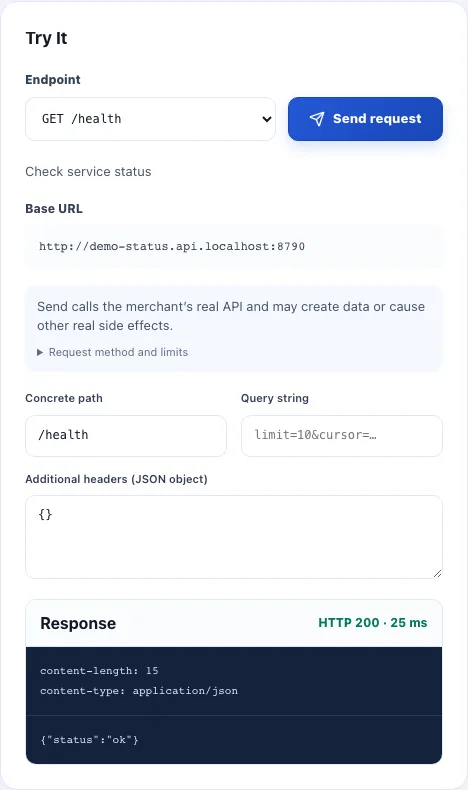
- In the API detail, use “Try It” to choose an endpoint your plan allows. Fill in its path parameters, query, additional authentication, and body from the documentation, choose “Send request”, and inspect the response status and body. The workspace uses your signed-in account, so no key is needed.
Choose a paid plan and confirm access
- Choose a plan on the product page. Review the monthly fee, metering objects, included units, overage prices, and permitted endpoints before subscribing.
- In Stripe Checkout, review the payment method, tax, and renewal conditions. A usage-only plan may have no initial charge but still requires a payment method.
- After payment or activation is confirmed, open “Purchased products” and select the API. Confirm the subscription is active before calling. If it is pending, check the payment status first.
Call from your workspace or your own application
- You can return any time: open the API in “Purchased products” and use “Try It” to test other permitted endpoints without entering or rotating a key.
- For your own application, copy the “Base URL” and actual endpoint path from the product detail, and use your saved key. The skeleton below is a template: replace every angle-bracket placeholder with values from the product documentation.
- Add query parameters, a request body, Content-Type, and additional authentication as required by that endpoint. Confirm the response matches your intended result.
curl --request "<HTTP_METHOD>" \
  "<API_BASE_URL><ENDPOINT_PATH>" \
--header "X-Invokora-Key: <YOUR_API_KEY>"Check your result
- Your purchases show an active subscription and a permitted endpoint returns the expected response.